PmWiki Clean URLs on nginx

Building on yesterday’s post on setting up PmWiki on nginx, I figured out the nginx configurations for PmWiki Clean URLs.

First, copy the example config.php out of the docs/ directory to the root of the PMWiki site, in my case, I installed to $DOCROOT/pmwiki/:

cd $DOCROOT
cp pmwiki/docs/sample-config.php pmwiki/config.php

Following the Clean URL notes, in pmwiki/config.php I set:

$EnablePathInfo = 1;

then I hit the wiki front page and started to look at the resulting link URLs like http://wiki.example.com/pmwiki/index.php/Main/WikiSandbox – they all 404 at this point, but this gives an idea of what I want to do next. I want to get rid of the /index.php/ bit, first, so in pmwiki/config.php I set:

$ScriptUrl = 'http://wiki.example.com/pmwiki';

This worked – the resulting URLs are like http://wiki.example.com/pmwiki/Main/WikiSandbox – but, let’s make that a little more portable for other vhost names or aliases and set it to:

$ScriptUrl = 'http://'.$_SERVER['HTTP_HOST'].'/pmwiki';

This works perfectly – now to take care of all the 404s with nginx rewrites. From yesterday’s config, I added the “location /pmwiki” and “location @pmwiki” blocks – here’s my complete nginx server configuration:

server {
  listen 80;
  charset utf-8;
  server_name wiki.example.com;
  access_log /var/log/nginx/wiki.access.log;
  root /var/www/wiki;
  index index.html index.php;

  location /pmwiki {
    error_page 404 = @pmwiki;
    log_not_found off;
  }

  location @pmwiki {
    rewrite ^/pmwiki/(.*)$ /pmwiki/?n=$1 last;
  }

  # configs from pmwiki .htaccess files
  location ~ ^/pmwiki/(cookbook|local|scripts|wiki.d|wikilib.d) {
    deny all;
  }
  location ^~ /pmwiki/docs {
    autoindex on;
    types {
      text/plain php;
    }
  }

  # pass PHP scripts to FastCGI server listening on 127.0.0.1:8080
  location ~ \.php$ {
    fastcgi_pass 127.0.0.1:8080;
    fastcgi_index index.php;
    fastcgi_param SCRIPT_FILENAME $document_root$fastcgi_script_name;
    include /etc/nginx/fastcgi_params;
  }

  # deny access to all .dot-files
  location ~ /\. {
    deny all;
  }
}

If PmWiki is installed in the document root of the site (not under http://…/pmwiki/), then adjust the ScriptUrl in config.php:

$ScriptUrl = 'http://'.$_SERVER['HTTP_HOST']'';

and the nginx config blocks above to:

  location / {...}

  location @pmwiki {
    rewrite ^/(.*)$ /?n=$1 last;
  }

  location ~ ^/(cookbook|local|scripts|wiki.d|wikilib.d) {...}

  location ^~ /docs {...}
PmWiki on nginx

I’ve been looking at a few wiki packages for a project and found PmWiki to my liking – under active development, a nice default skin, easily customizable, and it does not require a database. My personal choice is ikiwiki, which I run on my laptop for quick notes, but since this project is for a non-technical user, I decided to look first at end-user ease of usability, the availability of free themes, and possible integration with WordPress in the future.

The vast majority of web software packages assume that the admin is running Apache. It is always fun and interesting to sort out how to incorporate the various configurations for nginx, when most of the software packages only document mod_rewrite rules or just throw things in .htaccess files.

This is a very simple install of PmWiki focused only on getting the nginx configuration right. This assumes that you already have an nginx site configured to run PHP scripts through fastcgi – I’m not documenting that here.

Grab the source tarball from the Download page on http://pmwiki.org/, or use Subversion to fetch the latest stable release ($DOCROOT is your site document root):

cd $DOCROOT
svn export svn://pmwiki.org/pmwiki/tags/latest pmwiki --force

Now, hitting the URL in a browser ($HOST is your site, of course) – http://$HOST/pmwiki/pmwiki.php – you should see a little note about PmWiki needing write access to the document store directory – a quick permissions change:

chmod 2775 pmwiki/

Then hit the URL again – you should see the Main page of PmWiki after it does it’s configuration 🙂 but no so fast! Secure that directory now that we are basically done installing:

chmod 0755 pmwiki/

Follow the notes for adding a one-liner wrapper index.php if you like.

OK, so PmWiki should be working, but probably has some hidden configurations:

$ find pmwiki/ -name .ht*
pmwiki/scripts/.htaccess
pmwiki/cookbook/.htaccess
pmwiki/local/.htaccess
pmwiki/docs/.htaccess
pmwiki/wiki.d/.htaccess

Yep.. each of those .htaccess files, except pmwiki/docs/.htaccess, is a “Deny from all” so that files in those directories cannot be accessed publicly. I also added the directory pmwiki/wikilib.d/ which has the default local PmWiki documentation files and other local wiki pages – OK.

pmwiki/docs/.htaccess is a modification of mime type, so that any files in that directory ending in ‘.php’ will be rendered as plain text – ah, the sample config.php is in there – OK.

Here is my resulting nginx vhost configuration for wiki.example.com (replace with your own server_name and site root directory):

server {
  listen 80;
  charset utf-8;
  server_name wiki.example.com;
  access_log /var/log/nginx/wiki.access.log;
  root /var/www/wiki;
  index index.html index.php;
  
  # configs from pmwiki .htaccess files
  location ~ ^/pmwiki/(cookbook|local|scripts|wiki.d|wikilib.d) {
    deny all;
  }
  location ^~ /pmwiki/docs {
    autoindex on;
    types {
      text/plain php;
    }
  }

  # pass PHP scripts to FastCGI server listening on 127.0.0.1:8080
  location ~ \.php$ {
    fastcgi_pass 127.0.0.1:8080;
    fastcgi_index index.php;
    fastcgi_param SCRIPT_FILENAME $document_root$fastcgi_script_name;
    include /etc/nginx/fastcgi_params;
  }

  # deny access to all .dot-files
  location ~ /\. {
    deny all;
  }
}

This should give a working default PmWiki site running on nginx with the same functionality and secured directories as if you installed on Apache – make sure this basic setup is working right before moving on.

Next configuration steps for my install will be rewrite rules for shortened clean URLs.

Update: here’s the next post on PmWiki Clean URLs on nginx

Lenny apt configs

A friend of mine, Major, asked for a little advice on Debian apt configuration for a stable production server. Over the years, I have learned a few little things with regards to apt configuration with sane access to newer backports and/or testing/unstable/alpha apt repositories, and particularly one gotcha when a new stable release is completed.

One of my favorite apt preference resources is maintained by Roderick Schertler, and I always keep his apt pinning page listed in my /etc/apt/preferences file.

I track Debian stable (currently “Lenny”) on production servers and upgrade only software that is absolutely necessary from backports or testing – the gotcha I mention above is when Debian releases a new “stable” (“Squeeze” is next). Without “oldstable” listed in the preferences file at a higher priority than “stable”, you might be in for a surprise one day with a long list of packages set to be upgraded to the new “stable” 😉 This is not particularly desirable in a production environment that will require a good deal of work to make sure a dist-upgrade to the new stable release will function properly.

On my workstations and laptop, I typically roll along with the “testing” (currently “Squeeze) apt repositories and update/upgrade daily for that new software fresh feeling. I use the same apt configurations and simply bump the testing preference to 910. This allows me to do things like ‘apt-cache policy $FOO’ to see what versions of a package are in all the releases, without trolling around packages.d.o.

Here’s a tarball of my Lenny apt configs and the contents:

/etc/apt/apt.conf – set lenny as the default release and bump the cache limit a lot higher

APT::Default-Release "lenny";
APT::Cache-Limit 33554432;

/etc/apt/sources.list – Lenny/testing/sid along with security, backports, debian-multimedia, and alpha kernel builds

# Lenny
deb http://ftp.us.debian.org/debian/ lenny main contrib non-free
deb-src http://ftp.us.debian.org/debian/ lenny main contrib non-free
deb http://security.debian.org/ lenny/updates main contrib non-free
deb-src http://security.debian.org/ lenny/updates main contrib non-free

# Testing
deb http://ftp.us.debian.org/debian/ testing main contrib non-free
deb-src http://ftp.us.debian.org/debian/ testing main contrib non-free
deb http://security.debian.org/ testing/updates main contrib non-free
deb-src http://security.debian.org/ testing/updates main contrib non-free

# Sid
deb http://ftp.us.debian.org/debian/ unstable main contrib non-free
deb-src http://ftp.us.debian.org/debian/ unstable main contrib non-free

# Experimental
deb http://ftp.us.debian.org/debian/ experimental main contrib non-free
deb-src http://ftp.us.debian.org/debian/ experimental main contrib non-free

#####
# Lenny Backports
deb http://www.backports.org/debian lenny-backports main contrib non-free
deb-src http://www.backports.org/debian lenny-backports main contrib non-free

# Debian Multimedia
deb http://www.debian-multimedia.org/ lenny main
deb-src http://www.debian-multimedia.org/ lenny main

# buildserver.net kernel buildd repo
# http://wiki.debian.org/DebianKernel
deb http://kernel-archive.buildserver.net/debian-kernel/ trunk main
deb-src http://kernel-archive.buildserver.net/debian-kernel/ trunk main

/etc/apt/preferences – the magic to not dork up a stable box.. read Roderick’s pinning page for really great explanations on how this all works

Explanation: see http://www.argon.org/~roderick/apt-pinning.html
Package: *
Pin: release o=Debian,a=oldstable
Pin-Priority: 905

Package: *
Pin: release o=Debian,a=stable
Pin-Priority: 900

Package: *
Pin: release o=Debian,a=testing
Pin-Priority: 400

Package: *
Pin: release o=Debian,a=unstable
Pin-Priority: 300

Package: *
Pin: release o=Debian
Pin-Priority: -1

Package: *
Pin: origin www.backports.org
Pin-Priority: 600

Package: *
Pin: origin www.debian-multimedia.org
Pin-Priority: 600

Package: *
Pin: release o=Debian-Kernel,a=kernel-dists-trunk
Pin-Priority: 200

What’s (not) in my bag..

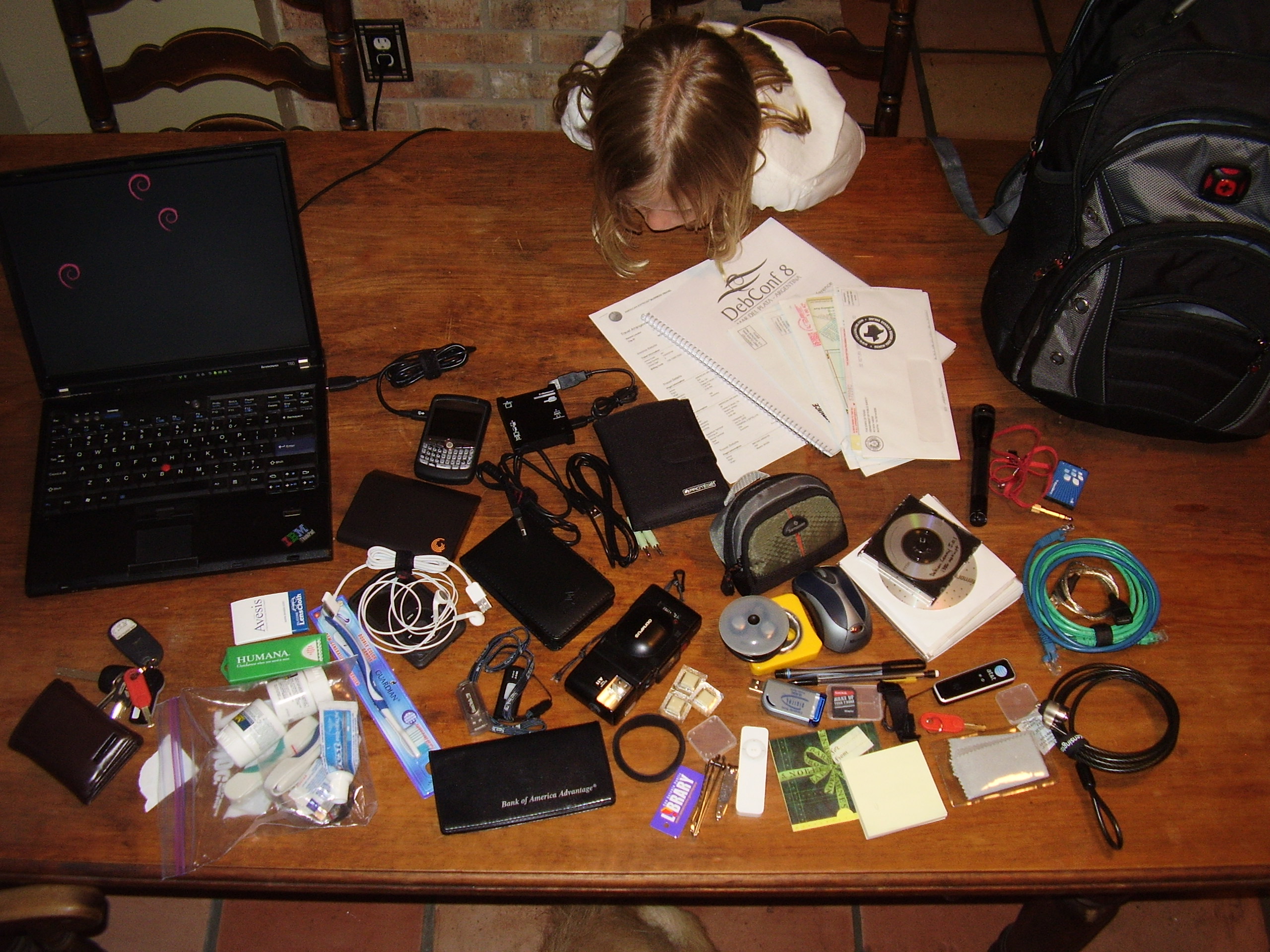
I have a flight in the morning, so thought I would clean out my backpack a bit and lighten the load, and it dawned on me after unloading that I should take a picture to embarrass remind myself to keep it minimal.. Lifehacker has been running a “What’s in our bags” series, and the crap in my backpack is quite opposite from the sparse contents of most of the Lifehacker staff posts..

The contents of the Swiss Army Ishouldreallygetasmallerone backpack:
(only things on the table that weren’t in the bag were keys, wallet, and Roxane..)
ThinkPad T60
power supply (plugged in the wall)
lens wipes
Band Aids
baggie with 2 travel toothbrushes, 2 half-empty little tooth paste tubes, Advil, Advil PM, ear plugs, mobile phone ear piece, and emergency nicotine gum
a new toothbrush
Blackberry and USB cable
multi-size memory card reader and USB cable
2 external drives and USB cables – one for music and one for encrypted machine backups
iPod Classic, ear buds, and cable
2 USB flash drives
checkbook
travel document case
mini stereo cable for iPod2RentalCar
trusty Olympus XA
more emergency nic-fit-fix-gum
two black bracelets (SEP and HTFU)
library card
large and small nail clippers
old iPod Shuffle
Olympus FE-115 and case with extra batteries and media cards
ear buds
..and another pair of ear buds
wireless mouse
Sharpie and mechanical pencil
SD/MMC USB media card reader with media card in it
MicroSD adapter
a couple empty media card holders
Barnes and Noble gift card from Xmas
sticky note pad
Debian Lenny Netinst mini CD, a blank CDR, and a flip case of Microsoft Windows crap (for helping others, not for me..)
AT&T mobile broadband dongle goodness
key for my office lappy lock
lappy screen wipe
Mini-Mag light
office access card lanyard
spare crackberry battery
mini-to-1/4″ stereo adapter
2 ethernet cables
yet another USB cable
the take-with-me lappy lock
travel itinerary printout
last year’s Debconf Proceedings
very important mail that needed to be looked into (unread for months..)

um, yeah.. all that..